


Included Health
4.81.29K Reviews
App Specs
- Version
- 2026.34.3
- Updated On
- License
- Free
- Downloads
- 100,000+
- Developer
- Included Health
- Categories
- Medical
- Platform
- Android
Screenshots

 Analysis by AppCompare
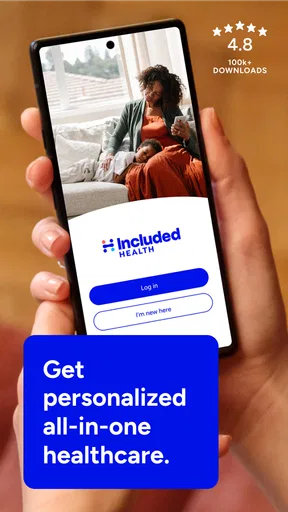
I approach Included Health less as a replacement for a doctor and more as a place to start when healthcare feels hard to coordinate. It is a medical app from Included Health, built around virtual care, help finding a path through healthcare, and advocacy support. That combination is useful when the question is not simply “What does this symptom mean?” but “Who should I contact, and what should I do next?”
That distinction matters. I would not expect a phone app to handle every health need, and I would not use virtual care for an emergency. But for non-emergency questions, care navigation, or help making sense of next steps, having a single starting point can be less stressful than searching the web and calling providers at random.
Where people can get stuck
Healthcare apps often feel simple until the moment you need them: you are unwell, short on time, and unsure which option fits. Included Health’s focus on navigation and advocacy makes it most promising when the obstacle is figuring out where to turn, rather than tracking numbers or building a personal wellness dashboard. I would begin by identifying the problem I want help with and keeping the question concise.
A practical example: imagine waking up with a non-urgent concern before a busy workday. Instead of opening several search results and trying to decide whether to book a visit, I would use the app as a first stop to explore virtual care or ask for guidance. If the issue sounds urgent or severe, I would skip app-based triage and seek emergency help directly. Convenience should never delay urgent care.
Setup checks that save time
Before relying on any healthcare service, I would check that I can sign in, that the app is current, and that my contact details are accurate. Those small checks are easier to do while feeling well than during a stressful moment. I would also keep relevant information nearby when starting a conversation, such as a medication list, allergies, the timing of a symptom, and any questions I do not want to forget.
Included Health is free to download, has an Everyone age rating, and its current version is 2026.22.1, with Android 10 as the minimum OS. It has been available since August 25, 2014; its 4.8 average comes from around 11,000 ratings, and it has over 100,000 installs. Those figures suggest an established service, but they cannot tell me whether a particular care option fits my needs or is available through my own healthcare arrangements. I would check access and eligibility in the app rather than assume every service applies to every user.
Recovering a workflow without guessing
If something does not work as expected, I would avoid repeating the same tap over and over. First I would check the internet connection, close and reopen the app, and make sure I am using the latest version. If I cannot sign in, I would verify the details I entered and use the app’s available account recovery route. If a conversation or appointment step stalls, I would note what I was trying to do and any message on screen before seeking support; that makes it easier to explain the problem clearly.
Worth Reading Before You Choose

EA SPORTS FC Mobile 26 Is a Bigger Football Game, but It Takes Time

Flipboard Shows What News Apps Must Do Beyond the Feed

Switching to Android Auto Means Rethinking Your Driving Routine

Google Calendar Makes a Crowded Week Easier to Manage

Ludo King Makes the Most of the Minutes Between Plans

Baby Panda World Brings Quick Play to Modern Phones, but Its Game Library Feels Busy
There is also a useful distinction between a technical problem and a care question. A failed screen or sign-in is an app issue; uncertainty about symptoms or which provider to contact is a healthcare-navigation question. Keeping those separate helps me choose the right next step instead of treating every delay as a software fault. I would not send sensitive health details through an unrelated channel just because the app is temporarily inconvenient.
When the app is not the cause
Care can take time for reasons an app cannot fix: a clinician may need more context, a suitable appointment may not be immediately available, or the next step may depend on a provider or plan. I would treat the app as a guide and communication channel, not a promise of instant answers or a guarantee that every service is covered. If a question involves cost, availability, or eligibility, I would confirm those details before making plans.
It is also worth choosing the right tool for the job. A regular in-person clinician is often better for a physical examination, ongoing treatment, or a concern that needs tests. Emergency services are the right choice for a potentially life-threatening problem. Search engines can offer general background, but they cannot assess my personal situation; a care-navigation service is more useful when I need help turning uncertainty into a concrete next step.
Getting Started with Included Health
First things first, downloading Included Health is a breeze. Available on both Android and iOS, it’s just a quick trip to the app store, and you’re ready to roll. Once installed, you’re greeted with a clean interface that’s both intuitive and inviting. No unnecessary clutter, just straight to the point. And who doesn’t love that?
Features that Matter
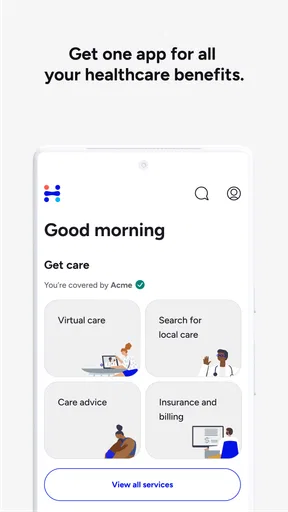
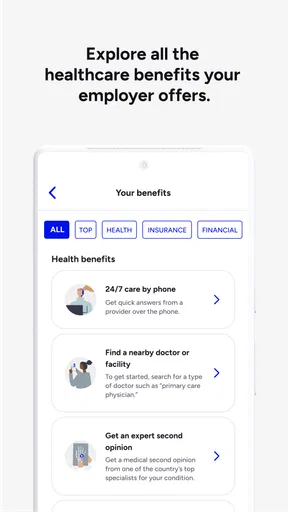
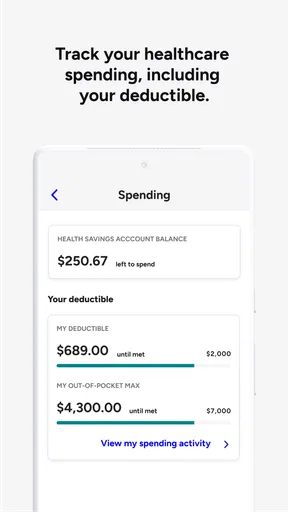
What really sets Included Health apart is its comprehensive suite of features. From personalized health records to 24/7 access to healthcare professionals, it’s like having a mini-clinic in your pocket. The app allows you to track your medical history seamlessly, and it even integrates with your existing health data, making it incredibly convenient.
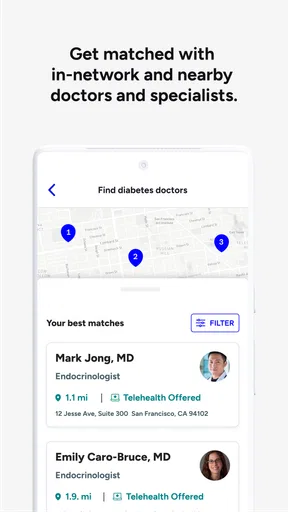
Need a specialist? No problem. The app provides recommendations based on your specific needs and preferences. Plus, there's a nifty feature that lets you schedule appointments directly through the app. It's like having a personal assistant who knows all about your health needs.
User Experience: Simplicity at Its Best
If you’re anything like me, you appreciate an app that doesn’t require a PhD to navigate. Included Health nails it in this department. The user interface is straightforward, making it easy for anyone to use, regardless of their tech-savviness. Everything is categorized neatly, so finding what you need is just a tap away.
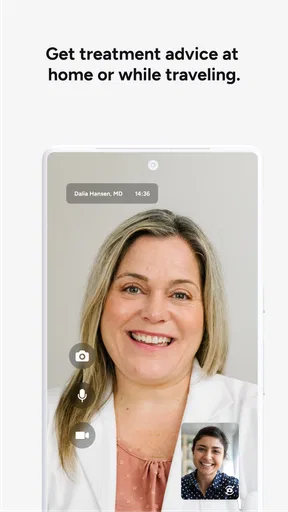
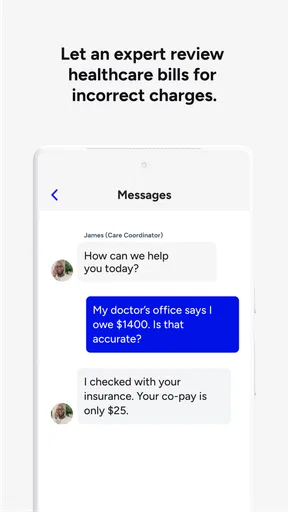
The app also offers a virtual concierge service. Imagine having someone you can chat with about any health concerns, any time of the day. It's not just about convenience; it’s about peace of mind too.
Security and Privacy: A Priority
Let’s face it, when it comes to health data, security is non-negotiable. Included Health takes this seriously. The app employs top-notch encryption to ensure your data stays private. It’s reassuring to know that your sensitive information is in safe hands.
Moreover, the app requires robust authentication measures, so you know that only you can access your health records. It's like having a digital vault for your health data.
Community and Resources
Another wonderful aspect is the community feature. You can connect with others who are dealing with similar health issues, which can be incredibly comforting. The app also provides access to a wealth of resources, from articles to videos, helping you stay informed about your health.
Included Health isn’t just an app; it’s a community. And that makes a world of difference when you’re managing your health journey.
The Final Verdict
So, is Included Health worth the download? In my honest opinion, absolutely. It’s a powerful tool that combines convenience, privacy, and community in one sleek package. Whether you’re juggling multiple appointments or just want to keep tabs on your health, this app has got your back.
Give it a try, and you might just find that managing your health has never been this easy or accessible. With Included Health, you’re not just getting an app; you’re getting a partner in your health journey.
A better fit for some healthcare routines than others
I see the clearest value for people who have a specific healthcare task ahead: finding a suitable kind of care, sorting out a referral question, or preparing to speak with a clinician. For someone who already knows which provider to call and has a reliable way to book, a separate navigation app may add an extra step rather than save one. The benefit is strongest when the hard part is coordinating the next move.
It can also help to use the app before a problem becomes urgent. I would keep a short note on my phone with the main concern, when it began, what has changed, and the outcome I want from the conversation. That is not a substitute for a medical record, but it can make a virtual discussion more focused and reduce the chance that I forget a key detail once I am talking to someone.
Make the first interaction more useful
One small habit I recommend is separating facts from questions before starting a care conversation. For example, I might write down “the cough started yesterday” as a fact, then add “should I arrange a visit?” as the question. This makes it easier to explain what is happening without jumping between details, and it gives the person helping me a clearer picture of what I need.
I would also avoid treating a recommendation as the end of the process. If the app points me toward a type of care or a specialist, I would confirm the practical details before relying on that route: whether the provider is appropriate for my concern, what the next step is, and whether I need information from my existing clinician. Navigation is valuable precisely because it can clarify a path, but I still need to make sure the path fits the situation.
How it compares with familiar alternatives
Compared with calling a clinic directly, a navigation-focused service can be helpful when I do not yet know which clinic or specialty makes sense. Direct contact is often simpler when I already have an established provider and a clear reason for the appointment. Compared with a general symptom-search website, the app’s care-oriented approach is more actionable when the goal is to connect uncertainty with a next step rather than read a broad list of possibilities.
It is not the same as a standalone video-visit service whose main purpose is to connect someone with a clinician for a remote appointment. Included Health’s appeal is the wider role implied by care navigation and advocacy, while virtual care is one part of the picture. For a straightforward issue that I already know can be handled remotely, a direct virtual-care option may feel faster. For a confusing care journey, navigation can be the more useful starting point.
Questions I would settle before depending on it
Would I use it for an emergency? No. I would contact emergency services for severe or potentially life-threatening symptoms rather than wait for an app interaction. Would I use it for every routine appointment? Probably not; if I have a regular clinician and know how to reach them, going directly to that office may be more efficient. Would I expect every service to be available to me? I would not assume so. I would check the options shown for my account and confirm details that affect access or cost.
Another reasonable question is whether I need to prepare anything. I would have my concern, relevant medicines, allergies, and preferred callback details at hand, and I would be ready to explain what I have already tried. I would not expect the app to replace my own records or remember every detail of my history. Keeping a personal list gives me a dependable reference if I need to switch between virtual guidance and an in-person visit.
My practical verdict
For me, the strongest reason to keep this app available is not that it makes healthcare effortless; healthcare rarely works that way. It is that a navigation and advocacy service can give a person a more organized first step when they are unsure whom to contact or how to move forward. Included Health is most suitable for people willing to use it as a guide, check the options that apply to them, and follow through with the appropriate provider.
I would recommend trying it when care coordination is the problem, while keeping expectations grounded: it cannot make every appointment immediate, settle every coverage question automatically, or replace emergency and in-person care. If I wanted a single-purpose symptom checker, a direct clinic booking tool, or only a video call, I would choose the service that matches that narrower need. For a broader starting point, Included Health earns a place on my phone, provided I treat it as support for making decisions rather than a substitute for them.
Pros
- User-friendly interface for easy navigation.
- Comprehensive health resource library.
- 24/7 access to health professionals.
- Tailored wellness programs available.
- Seamless integration with wearable devices.
Cons
- Subscription required for full access.
- Limited offline functionality.
- Not available in all regions.
- May require a strong internet connection.
- Some services may incur additional fees.
FAQs for Included Health
What is Included Health and what services does it offer?
Included Health is a comprehensive healthcare app designed to connect users with various medical services. It offers features like virtual doctor consultations, mental health support, prescription management, and personalized care plans. The app aims to streamline healthcare access, making it easier for users to manage their medical needs from the convenience of their mobile devices.
Is the Included Health app free to use, or are there subscription fees?
Included Health offers both free and premium services. Basic features such as general health information and certain consultations may be free, but more advanced services like specialized care and therapy sessions could require a subscription or one-time fees. Users should check within the app for specific pricing details related to their needs.
How does Included Health ensure the privacy and security of user data?
Included Health prioritizes user privacy and data security by employing advanced encryption technologies. The app complies with healthcare regulations such as HIPAA to protect sensitive information. Users can trust that their medical records and personal data are handled with utmost confidentiality, ensuring a secure experience.
Can I use Included Health to schedule in-person doctor visits?
Yes, Included Health allows users to schedule in-person doctor visits alongside its virtual offerings. The app connects users with local healthcare providers, making it easy to book appointments directly through the platform. This integration ensures a seamless healthcare experience, whether online or in-person.
Is Included Health available internationally, or is it limited to specific regions?
Included Health primarily operates in the United States, providing services tailored to the U.S. healthcare system. However, expansion plans may include international regions in the future. Users outside the U.S. should check the app's availability and specific features applicable to their location.


